Group fPCA Pipeline
This page documents the end-to-end workflow for group-level functional PCA and downstream group-discrimination analysis.
The workflow has two main stages:
``fpca-main`` — extract per-subject B-spline coefficients, build a shared group PCA space on the training set, and project held-out test subjects into that space.
``fmri-fpca-pipeline`` — reconstruct spatiotemporal signals from the group PCA outputs, run alignment / RSA analysis, train ML classifiers, and evaluate generalization on a test set.
Overview
Recommended execution order:
Training/Test subjects (same output folder)
└── fpca-main  --mode pca-singles        (per-subject analysis train and test sets together)

Training subjects only
└── fpca-main  --mode train-pca-group  (shared group PCA train set only)

Test subjects only
└── fpca-main  --mode test-pca-project   (project test set onto training PCA space)

Downstream analysis (per PC, per movement)
├── fmri-fpca-pipeline  --mode align-signals
├── fmri-fpca-pipeline  --mode ml
├── fmri-fpca-pipeline  --mode stat
└── fmri-fpca-pipeline  --mode ml-test   (selected pairs only)
Note
pca-singles and train-pca-group / test-pca-project must be run as separate invocations.
When a group mode is present, fpca-main collects existing per-subject outputs instead of re-running single-subject analysis.
Entry Point:
Input file naming
The pipeline expects preprocessed BOLD files and matching masks. For training and test sets, the BOLD files and masks should be organized as follows:
input_dir_train/
├── sub-<sample-1>_ses-[A-Za-z0-9]+.*-movement1_.*-preproc_bold.nii.gz
├── sub-<sample-1>_ses-[A-Za-z0-9]+.*-movement2_.*-brain_mask.nii.gz
├── sub-<sample-1>_ses-[A-Za-z0-9]+.*-movement1_.*-preproc_bold.nii.gz
├── sub-<sample-1>_ses-[A-Za-z0-9]+.*-movement2_.*-brain_mask.nii.gz
├── ...
├── sub-<sample-N>_ses-[A-Za-z0-9]+.*-movement1_.*-preproc_bold.nii.gz
├── sub-<sample-N>_ses-[A-Za-z0-9]+.*-movement2_.*-brain_mask.nii.gz
├── sub-<sample-N>_ses-[A-Za-z0-9]+.*-movement1_.*-preproc_bold.nii.gz
└── sub-<sample-N>_ses-[A-Za-z0-9]+.*-movement2_.*-brain_mask.nii.gz

input_dir_test/
├── sub-<sample-1>_ses-[A-Za-z0-9]+.*-movement1_.*-preproc_bold.nii.gz
├── sub-<sample-1>_ses-[A-Za-z0-9]+.*-movement2_.*-brain_mask.nii.gz
├── sub-<sample-1>_ses-[A-Za-z0-9]+.*-movement1_.*-preproc_bold.nii.gz
├── sub-<sample-1>_ses-[A-Za-z0-9]+.*-movement2_.*-brain_mask.nii.gz
├── ...
├── sub-<sample-M>_ses-[A-Za-z0-9]+.*-movement1_.*-preproc_bold.nii.gz
├── sub-<sample-M>_ses-[A-Za-z0-9]+.*-movement2_.*-brain_mask.nii.gz
├── sub-<sample-M>_ses-[A-Za-z0-9]+.*-movement1_.*-preproc_bold.nii.gz
└── sub-<sample-M>_ses-[A-Za-z0-9]+.*-movement2_.*-brain_mask.nii.gz
Part 1 — fpca-main script
A. Mode: pca-singles
Runs independent functional PCA on each subject. For every subject this mode:
Applies preprocessing (filtering, smoothing) unless
--processedis set.Fits B-spline basis functions and extracts voxel-wise coefficient matrices.
Performs subject-level PCA and saves all results under that subject’s output folder.
The key artifact for later group analysis is eigvecs_eigval_F.npz, which stores the per-voxel B-spline coefficient matrix (C), along with the subject-specific eigenvectors, eigenvalues, basis matrix F, and time vector.
When --low-mem is set, only NPZ/TXT/NIfTI files are written (no PNG plots).
The full description of the other parameters can be found in Run fPCA.
Example — automatically collect files using Bash and run fpca-main on each one with the default parameters:
Run the following script twice with the same output directory, once for the training set and once for the test set:
chmod +x run_fpca.sh
./run_fpca.sh /path/to/fpca-env pca-singles /path/to/preprocessed/input_dir_train /path/to/output
./run_fpca.sh /path/to/fpca-env pca-singles /path/to/preprocessed/input_dir_test /path/to/output
For example, if your virtual environment is located at /home/user/fpca-env, your preprocessed input directories are /home/user/preprocessed/input_dir_train//home/user/preprocessed/input_dir_test, and you want the output to go to /home/user/output_pca, you would run:
chmod +x run_fpca.sh
./run_fpca.sh /home/user/fpca-env pca-singles /home/user/preprocessed/input_dir_train /home/user/output_pca
./run_fpca.sh /home/user/fpca-env pca-singles /home/user/preprocessed/input_dir_test /home/user/output_pca
run_fpca.sh file content:
#!/usr/bin/env bash

# Activate the virtual environment from the first argument
source "$1/bin/activate"

# Assign the remaining arguments to variables
MODE="$2"
INPUT_DIR="$3"
PROJECT_OUTPUT_DIR="$4"
#########################################################################################

mkdir -p "$PROJECT_OUTPUT_DIR"

# Force mathematical libraries to use exactly one thread per process
# This is crucial to prevent CPU thrashing when running parallel jobs
export OMP_NUM_THREADS=1
export OPENBLAS_NUM_THREADS=1
export MKL_NUM_THREADS=1
export VECLIB_MAXIMUM_THREADS=1
export NUMEXPR_NUM_THREADS=1

# Initialize separate arrays for movement 1 and movement 2
NII_FILES_MOV1=()
MASK_FILES_MOV1=()

NII_FILES_MOV2=()
MASK_FILES_MOV2=()

# Loop through all files and categorize them based on the task string
for bold_file in "$INPUT_DIR"/*.nii.gz; do
    if [ -f "$bold_file" ]; then
        filename=$(basename "$bold_file")
        base=${filename%%-preproc_bold*}
        mask_file="$INPUT_DIR/${base}-brain_mask.nii.gz"

        if [ -f "$mask_file" ]; then
            # Route to mov1 arrays if the filename contains '-movement1'
            if [[ "$filename" == *"-movement1"* ]]; then
                NII_FILES_MOV1+=("$bold_file")
                MASK_FILES_MOV1+=("$mask_file")
            # Route to mov2 arrays if the filename contains '-movement2'
            elif [[ "$filename" == *"-movement2"* ]]; then
                NII_FILES_MOV2+=("$bold_file")
                MASK_FILES_MOV2+=("$mask_file")
            fi
        fi
    fi
done


# ==========================================
# Execute Group fPCA for Movement 1
# ==========================================
echo "Found ${#NII_FILES_MOV1[@]} subjects for Movement 1. Starting Group fPCA pipeline..."

OUTPUT_DIR_MOV1="$PROJECT_OUTPUT_DIR"/outputs_mov1
if [ ${#NII_FILES_MOV1[@]} -gt 0 ]; then
    fpca-main \
        --mode "$MODE" \
        --nii-files "${NII_FILES_MOV1[@]}" \
        --mask-files "${MASK_FILES_MOV1[@]}" \
        --output-folder "$OUTPUT_DIR_MOV1" \
        --calc-penalty-skfda \
        --n-jobs 5 \
        --low-mem
else
    echo "Warning: No files found for Movement 1. Skipping..."
fi

echo "--------------------------------------------------"

# ==========================================
# Execute Group fPCA for Movement 2
# ==========================================
echo "Found ${#NII_FILES_MOV2[@]} subjects for Movement 2. Starting Group fPCA pipeline..."

OUTPUT_DIR_MOV2="$PROJECT_OUTPUT_DIR"/outputs_mov2
if [ ${#NII_FILES_MOV2[@]} -gt 0 ]; then
    fpca-main \
        --mode "$MODE" \
        --nii-files "${NII_FILES_MOV2[@]}" \
        --mask-files "${MASK_FILES_MOV2[@]}" \
        --output-folder "$OUTPUT_DIR_MOV2" \
        --n-jobs 5 \
        --calc-penalty-skfda \
        --low-mem
else
    echo "Warning: No files found for Movement 2. Skipping..."
fi

echo "All tasks completed successfully!"
Output directory layout
After a full training run, each subject’s outputs in each movement are written to a sub-folder named after <base> (the part before -preproc_bold).
The output folder typically looks like:
proj_output/
├── outputs_mov1/
│   ├── global_F_U_matrices.npz
│   ├── sample-1/
│   │   ├── eigvecs_eigval_F.npz
│   │   ├── original_averaged_signal_intensity.png
│   │   ├── eigenfunction_0_importance_map.nii.gz
│   │   ├── eigenfunction_1_importance_map.nii.gz
│   │   ├── ...
│   │   ├── eigenfunction_0_best_voxel.txt
│   │   ├── eigenfunction_1_best_voxel.txt
│   │   ├── ...
│   │   ├── temporal_profile_pc_0.txt
│   │   ├── temporal_profile_pc_1.txt
│   │   └── ...
│   ├──...
│   ├──...
│   ├── sample-N/
│   │   └── ...
├── outputs_mov2/
│   ├── global_F_U_matrices.npz
│   ├── sample-1/
│   │   └── ...
│   ├──...
│   ├── sample-N/
│   │   └── ...
B. Mode: train-pca-group
Builds a shared group PCA space across all listed training subjects.
This mode reads the coefficient matrices saved by pca-singles (from eigvecs_eigval_F.npz), computes a global mean and group covariance, and extracts group-level principal components. Each group PC index then represents the same functional pattern across subjects — a property not guaranteed when PCA is run independently per subject.
The mode also writes group-level temporal profiles and per-subject spatial scores/maps in the shared PC space.
Prerequisites: pca-singles must have been run on all training subjects into the same --output-folder.
Example — run fpca-main in mode train-pca-group on the training set:
Run the following script with the same output directory as in the first step.
./run_fpca.sh /path/to/fpca-env train-pca-group /path/to/preprocessed/input_dir_train /path/to/output
For example, if your virtual environment is located at /home/user/fpca-env, your preprocessed input directory of the train set is /home/user/preprocessed/input_dir_train, and you want the output to go to /home/user/output_pca, you would run:
./run_fpca.sh /home/user/fpca-env train-pca-group /home/user/preprocessed/input_dir_train /home/user/output_pca
Group-level outputs (train-pca-group)
This step add “group” files into the existing output folders.
The output folder typically looks like:
proj_output/
├── outputs_mov1/
│   ├── global_mean.npy
│   ├── global_eigvecs.npy
│   ├── global_F_U_matrices.npz
│   ├── sample-1/
│   │   ├── eigvecs_eigval_F.npz
│   │   ├── global_pca_scores.npy
│   │   ├── original_averaged_signal_intensity.png
│   │   ├── eigenfunction_0_importance_map.nii.gz
│   │   ├── eigenfunction_1_importance_map.nii.gz
│   │   ├── eigenfunction_0_importance_map_group.nii.gz
│   │   ├── eigenfunction_1_importance_map_group.nii.gz
│   │   ├── ...
│   │   ├── eigenfunction_0_best_voxel.txt
│   │   ├── eigenfunction_1_best_voxel.txt
│   │   ├── ...
│   │   ├── temporal_profile_pc_0.txt
│   │   ├── temporal_profile_pc_1.txt
│   │   ├── temporal_profile_pc_0_group.txt
│   │   ├── temporal_profile_pc_1_group.txt
│   │   └── ...
│   ├──...
│   ├──...
│   ├── sample-N/
│   │   └── ...
├── outputs_mov2/
│   ├── global_mean.npy
│   ├── global_eigvecs.npy
│   ├── global_F_U_matrices.npz
│   ├── sample-1/
│   │   └── ...
│   ├──...
│   ├── sample-N/
│   │   └── ...
Files at the output-folder root:
File |
Description |
|---|---|
|
Global mean of B-spline coefficients across all training voxels. Used to center test data during projection. |
|
Group eigenvectors. Defines the shared PC space. |
|
Basis matrix |
|
Group-level temporal profile for PC |
Per-subject files (inside each subject folder):
File |
Description |
|---|---|
|
Contains the combined spatial scores for all extracted Principal Components (PCs) per subject, serving as the primary feature matrix for the downstream Machine Learning pipeline. |
|
3D spatial importance map for PC |
|
Middle-slice plot (skipped with |
C. Mode: test-pca-project
Projects test-set subjects onto the PCA space learned during train-pca-group.
For each test subject the pipeline:
Loads the subject’s coefficient matrix from
eigvecs_eigval_F.npz(produced bypca-singleson the test subject).Centers the coefficients using the training
global_mean.npy.Computes spatial scores using the training
global_eigvecs.npy.Saves projected scores and 3D importance maps.
Prerequisites:
train-pca-groupcompleted on training subjects in the parent output folder.pca-singlescompleted on every test subject (into subject folders under the same output tree).global_mean.npyandglobal_eigvecs.npymust exist two levels above each test subject folder (i.e. at the movement output root).
Example — run fpca-main in mode test-pca-project on the training set:
Run the following script with the same output directory as in the first step.
./run_fpca.sh /path/to/fpca-env test-pca-project /path/to/preprocessed/input_dir_test /path/to/output
For example, if your virtual environment is located at /home/user/fpca-env, your preprocessed input directory of the train set is /home/user/preprocessed/input_dir_test, and you want the output to go to /home/user/output_pca, you would run:
chmod +x run_fpca.sh
./run_fpca.sh /home/user/fpca-env test-pca-project /home/user/preprocessed/input_dir_test /home/user/output_pca
Test-set outputs (test-pca-project)
File |
Description |
|---|---|
|
Projected spatial scores in the training group PC space. |
|
3D importance map for PC |
Part 2 — fmri-fpca-pipeline script
Workflow
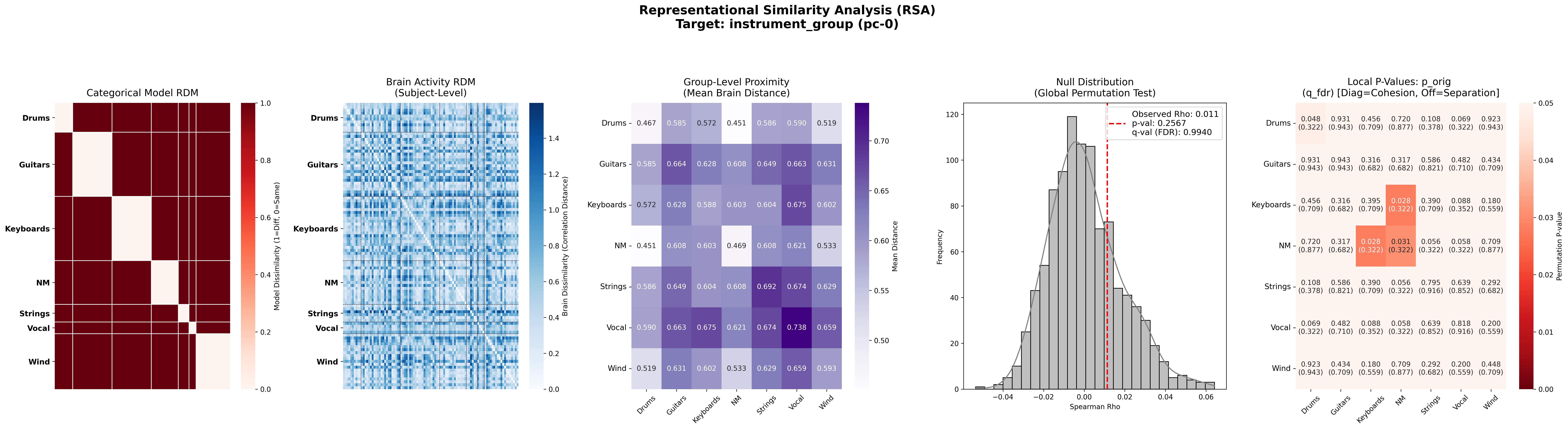
``align-signals`` (run first) — computes RSA distances between instrument groups based on the full recovered time series, not isolated feature windows. Identifies which group pairs are most separated in signal space.
``ml`` — trains classifiers on extracted features from the training set. Saves the best model per (model, hyperparameters) combination.
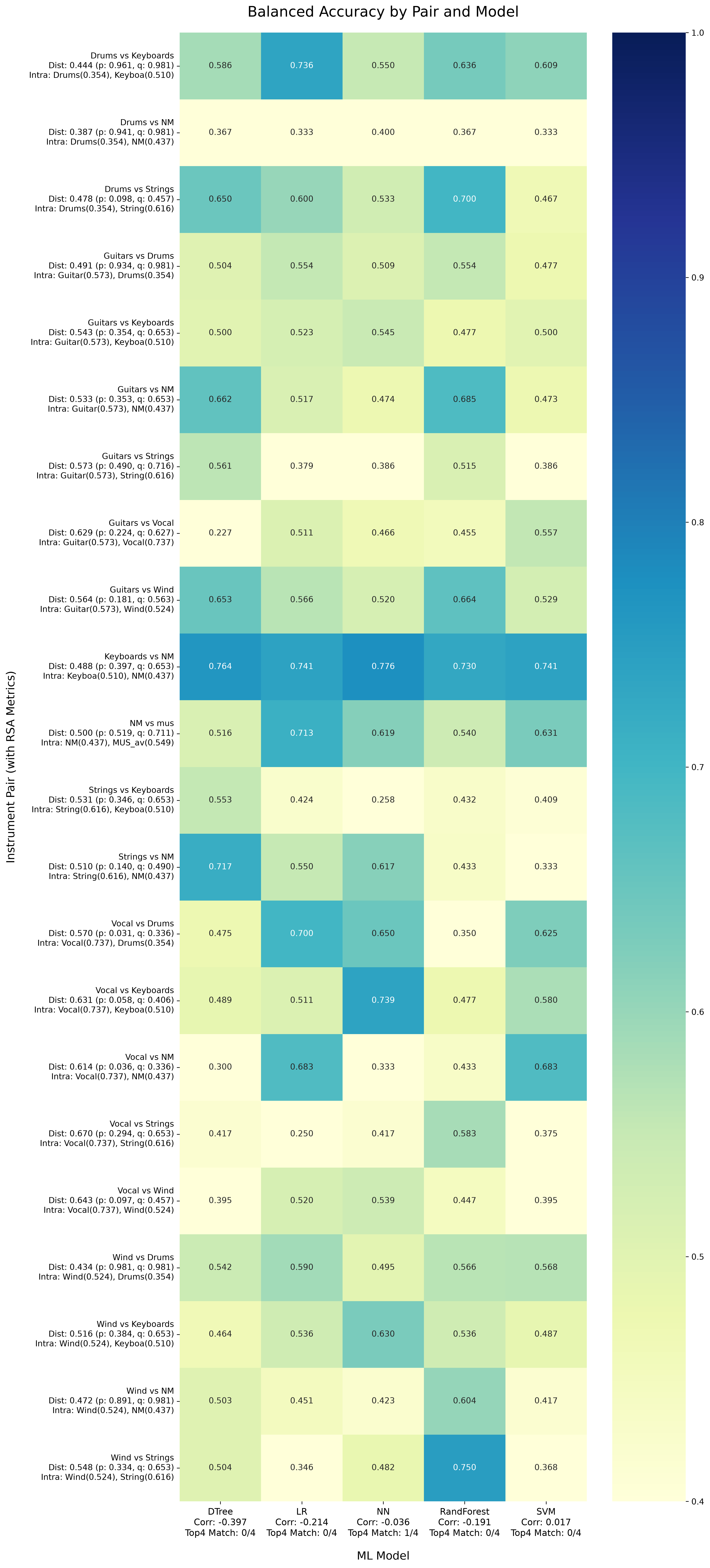
``stat`` — merges ML balanced-accuracy scores with RSA metrics from step 1. Use this to identify pairs that are both ML-discriminable and consistent with whole-sequence alignment.
``ml-test`` — apply saved models to held-out test subjects for pairs selected from step 3. Configure pairs in
test_pairs.json(see below).
Note
ML training uses windowed / event-driven features extracted from the signal, while align-signals operates on the full sequence. Reviewing stat output helps confirm that ML findings are consistent with whole-signal RSA separation.
Entry point for downstream group-discrimination analysis on the outputs of Part 1.
fmri-fpca-pipeline \
    --mode <MODE> \
    --input-dir <DIR> \
    --output-dir <DIR> \
    --metadata-csv <CSV> \
    --ml-hyperparameters-file <JSON> \
    [options]
Parameters
Modes (can be combined in one invocation, e.g. --mode align-signals ml):
align-signals— signal alignment and RSA analysis on the full recovered spatiotemporal sequence.ml— train ML classifiers on the training set (is_train_set == 1).stat— cross-reference ML results with RSA alignment metrics.ml-test— evaluate saved models on the test set for pairs listed in--test-pairs-file.all— run all of the above in sequence.
Key options
--target-pc-index <INT>— which PC to analyze (0…n_pcs-1). Run separately for each PC.--n-pcs— number of PCs available in the input (default:7).--extra-features-set— feature extraction mode:0= flattened signal only;1= fixed 3-window split;2= event-driven music transitions (default:1).--n-permutations— permutations for the ML significance test (default:200).--test-pairs-file— JSON file listing class pairs to evaluate inml-testmode.--ml-models— models to train (default:LR SVM NN DTree RandForest).--groups— instrument groups for pairwise comparisons.--jobs— parallel workers for ML grid search (default:16).
files arguments
--input-dir— parent directory containingoutputs_mov1/andoutputs_mov2/fromfpca-main.--output-dir— directory for pipeline outputs (alignment, ML, statistics, test results).--metadata-csv— participant metadata (must includesub_id,instrument_group,is_train_set, and genre columns).--ml-hyperparameters-file— JSON file with hyperparameter grids per model (see example bellow).--test-pairs-file— JSON file containing specific pairs to evaluate in test mode (see example bellow).--use-raw-data/--raw-data-path— optional alternative that uses raw BOLD time series instead of recovered PC signals.
Requied files
Prepare a metadata CSV file with columns
sub_id,instrument_group,is_train_set, and any other grouping columns you want to analyze (e.g.group,genre). See an example in status_fMRI_participants.csv. Note that in last column,is_train_set, a value of1indicates that the subject is part of the training set (all subjects in/home/user/preprocessed/input_dir_train), while0indicates that the subject is part of the test set (all subjects in/home/user/preprocessed/input_dir_test).Prepare a JSON file with hyperparameter grids for each ML model. See an example ml_hyperparameters.json.
Prepare a JSON file with the list of test pairs to evaluate in
ml-testmode. See an example test_pairs.json.
How signals are reconstructed
For each subject and PC, the pipeline combines:
A group-level temporal profile from
outputs_mov<N>/temporal_profile_pc_<k>_group.txtA subject-specific spatial map from
outputs_mov<N>/<subject>/eigenfunction_<k>_importance_map_group.nii.gz
The outer product of regional weights (from the NIfTI, resampled to the Schaefer-100 atlas) and the temporal profile yields a Region × Time matrix per movement. Movement 1 and movement 2 matrices are concatenated along time to form the full signal used in alignment and ML.
Helper script for running the pipeline
Save the following content as
run_fpca.shand make it executable (chmod +x run_fpca.sh)
run_fpca.sh file content:
#!/usr/bin/env bash

# Set default values
FEATURES_SETS="1"
PC_INDEX="0"
RAW_DATA_PATH=""
N_PERMUTATIONS=5
MAX_PC=6

# Parse arguments sequentially
while [[ "$#" -gt 0 ]]; do
    case $1 in
        --venv) VENV="$2"; shift 2 ;;
        --mode) MODE="$2"; shift 2 ;;
        --features-sets) FEATURES_SETS="$2"; shift 2 ;;
        --pc-index) PC_INDEX="$2"; shift 2 ;;
        --input-dir) INPUT_DIR="$2"; shift 2 ;;
        --output-dir) OUTDIR="$2"; shift 2 ;;
        --metadata-file) METADATA_FILE="$2"; shift 2 ;;
        --hyperparameters-file) HYPERPARAMETERS_FILE="$2"; shift 2 ;;
        --test-pairs-file) TEST_PAIRS_FILE="$2"; shift 2 ;;
        --raw-data-path) RAW_DATA_PATH="$2"; shift 2 ;;
        --n-permutations) N_PERMUTATIONS="$2"; shift 2 ;;
        --max-pc) MAX_PC="$2"; shift 2 ;;
        *) shift ;; # Ignore unknown parameters
    esac
done

# Evaluate conditions after parsing arguments
if [ "$RAW_DATA_PATH" != "" ]; then
    echo "Using raw data path: $RAW_DATA_PATH"
    MAX_PC=0
fi

# Activate virtual environment
source "$VENV/bin/activate"

#########################################################################################

mkdir -p "$OUTDIR"

# Iterate over feature sets
for SET_NUM in $FEATURES_SETS; do

    # Define common base arguments for this specific feature set
    BASE_CMD_ARGS=(
        "--input-dir" "$INPUT_DIR"
        "--output-dir" "$OUTDIR/full_pipeline_set${SET_NUM}"
        "--metadata-csv" "$METADATA_FILE"
        "--ml-hyperparameters-file" "$HYPERPARAMETERS_FILE"
        "--test-pairs-file" "$TEST_PAIRS_FILE"
        "--extra-features-set" "$SET_NUM"
        "--n-permutations" "$N_PERMUTATIONS"
    )

    # Conditionally append the raw data arguments if the path is provided
    if [ -n "$RAW_DATA_PATH" ]; then
        BASE_CMD_ARGS+=("--use-raw-data" "--raw-data-path" "$RAW_DATA_PATH")
    fi

    # Execute the pipeline based on the requested mode
    if [ "$MODE" == "align-signals" ]; then
        for ((i=0; i<=MAX_PC; i++)); do
            # Append the dynamic arguments on the fly and run in background
            fmri-fpca-pipeline "${BASE_CMD_ARGS[@]}" "--mode" "$MODE" "--target-pc-index" "$i" &
        done
        # Wait for all background processes to finish before moving to the next feature set
        wait

    elif [[ "$MODE" == "ml" || "$MODE" == "stat" || "$MODE" == "ml-test" ]]; then
        for i in $PC_INDEX; do
            # Append the dynamic arguments on the fly and run synchronously
            fmri-fpca-pipeline "${BASE_CMD_ARGS[@]}" "--mode" "$MODE" "--target-pc-index" "$i"
        done

    else
        echo "Warning: Unrecognized mode '$MODE'"
    fi

done

echo "All tasks completed successfully!"
A. Mode: align-signals
Runs signal alignment plots and RSA (representational similarity analysis) between instrument groups.
Run align-signals mode for PC indices 0 and 1 using the recovered signals from pc 0 and 1 (default) in the training set.
The
input-dirshould point to the output offpca-main(/home/user/output_pca- the parent folder containingoutputs_mov1/andoutputs_mov2/).The output will be saved in
<output-dir>/1_align_signals/
./run_pipeline.sh \
  --mode "align-signals" \
  --venv "/home/user/fpca-env" \
  --input-dir "/home/user/output_pca" \
  --output-dir "/home/user/output_pipeline" \
  --features-sets "1" \
  --pc-index "0 1" \
  --metadata-file "status_fMRI_participants.csv" \
You can try to align-signals using the training raw data in order to compare the results from the recovered signals with the original BOLD time series.
The
raw-data-pathshould point to the preprocessed training data.
./run_pipeline.sh \
  --mode "align-signals" \
  --venv "/home/user/fpca-env" \
  --input-dir "/home/user/output_pca" \
  --output-dir "/home/user/output_pipeline" \
  --features-sets "1" \
  --metadata-file "status_fMRI_participants.csv" \
  --raw-data-path "/home/user/preprocessed/input_dir_train"
Outputs (under <output-dir>/1_align_signals/):
File |
Description |
|---|---|
|
Heatmap of recovered signals sorted by metadata column (e.g. |
|
RSA distance matrix and clustering for a metadata grouping. |
|
Pairwise inter-group distances, p/q values, and intra-group cohesion. |
|
Text summary of RSA clustering and permutation statistics. |
B. Mode: ml
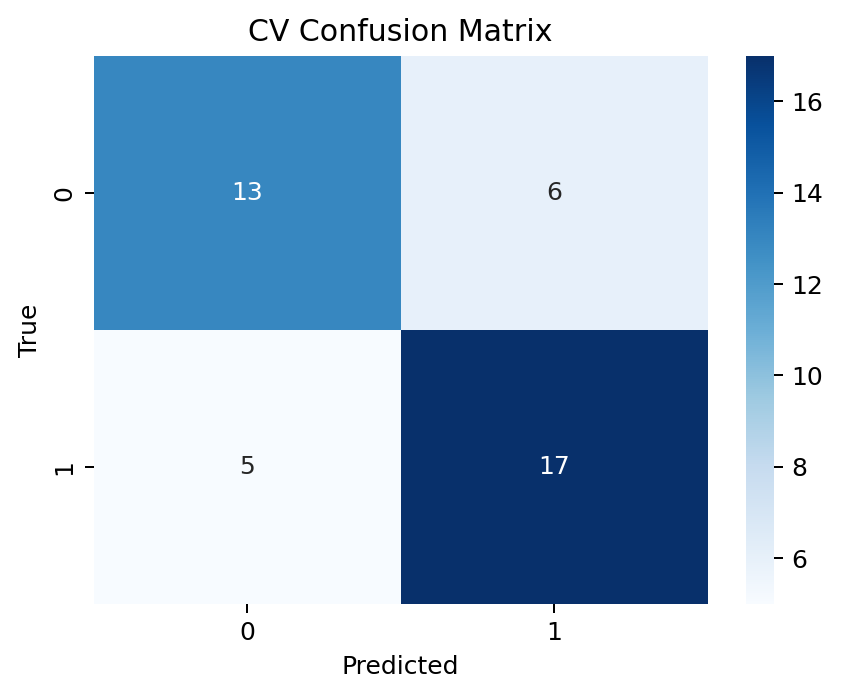
Trains binary classifiers for every combination of instrument groups (e.g. Guitars vs Wind, Strings vs Keyboards, mus vs NM). Uses nested cross-validation on training subjects and saves the best tuned pipeline.
The search space for hyperparameters is defined in the JSON file provided to ml-hyperparameters.json. It can take a time to run all combinations, so you can delete some models or parameters from the JSON file to reduce the search space.
Run ML mode for PC indices 0 and 1 using training data.
The parameter
--n-permutationscontrols the number of permutations for the significance test. It is set to 5 by default to make the grid search of the hyper-parameters computationally feasible. However, after finding the best model, you can rerun it (only on the selected parameters by setting them inml_hyperparameters.jsonfile) with 5000 or more permutations to obtain a reliable p-value estimation.
..code-block:: bash
- ./run_pipeline.sh
–mode “ml” –venv “/home/user/fpca-env” –input-dir “/home/user/output_pca” –output-dir “/home/user/output_pipeline” –features-sets “1” –pc-index “0 1” –metadata-file “status_fMRI_participants.csv” –hyperparameters-file “ml_hyperparameters.json”
Running on raw data instead of recovered signals is also possible. The
raw-data-pathshould point to the preprocessed training data.
./run_pipeline.sh \
  --mode "ml" \
  --venv "/home/user/fpca-env" \
  --input-dir "/home/user/output_pca" \
  --output-dir "/home/user/output_pipeline" \
  --features-sets "1" \
  --metadata-file "status_fMRI_participants.csv" \
  --hyperparameters-file "ml_hyperparameters.json" \
  --raw-data-path "/home/user/preprocessed/input_dir_train"
Outputs (under each folder <output-dir>/2_ml_pc-<k>/ml_<group0>_vs_<group1>/) that contains the best model for each pair of instrument groups:
File |
Description |
|---|---|
|
CV accuracy, balanced accuracy, ROC AUC, confusion matrix, permutation p-value. |
|
Confusion matrix plot. |
|
Permutation-test null distribution. |
|
Per-fold CV predictions. |
|
Saved best model (loaded by |
|
Interactive PCA / UMAP / t-SNE visualizations of the feature space. |
C. Mode: stat
Cross-references ML reports with RSA metrics from align-signals. Produces a ranked summary to help choose which group pairs to test for generalization.
Run statistical analysis for PC indices 0 and 1 using training data
./run_pipeline.sh \
  --mode "stat" \
  --venv "/home/user/fpca-env" \
  --input-dir "/home/user/output_pca" \
  --output-dir "/home/user/output_pipeline" \
  --features-sets "1" \
  --pc-index "0 1" \
  --metadata-file "status_fMRI_participants.csv" \
Running on raw data instead of recovered signals is also possible. The
raw-data-pathshould point to the preprocessed training data.
./run_pipeline.sh \
  --mode "stat" \
  --venv "/home/user/fpca-env" \
  --input-dir "/home/user/output_pca" \
  --output-dir "/home/user/output_pipeline" \
  --features-sets "1" \
  --metadata-file "status_fMRI_participants.csv" \
  --raw-data-path "/home/user/preprocessed/input_dir_train"
Outputs (under <output-dir>/2_ml_pc-<k>/global_summary/):
File |
Description |
|---|---|
|
All (pair, model) combinations with balanced accuracy, RSA distance, p/q values, and intra-group cohesion. |
|
Heatmap of balanced accuracy; y-axis labels include RSA distance metrics per pair; x-axis shows correlation with RSA and top-3 overlap score. |
|
Per-model correlation between RSA distance and ML balanced accuracy, plus top-3 overlap counts. |
Use all_pairs_summary.csv and the heatmap to select well-separated pairs before running ml-test.
D. Mode: ml-test
Loads the best saved model for each specified pair and evaluates it on test subjects (is_train_set == 0 in the metadata CSV).
Create test pairs file (test_pairs.json) with the list of instrument group pairs to evaluate. For example:
# No comma after the last pair !!!
{
    "test_pairs": [
        ["Drums", "Keyboards"],
        ["NM", "Keyboards"],
        ["Drums", "Strings"],
        ["Guitars", "NM"],
        ["Guitars", "Wind"],
        ["NM", "mus"],
        ["Strings", "NM"],
        ["Vocals", "NM"],
        ["Wind", "Strings"]
    ]
}
Run ML test mode for PC indices 0 and 1 using test data.
./run_pipeline.sh \
  --mode "ml-test" \
  --venv "/home/user/fpca-env" \
  --input-dir "/home/user/output_pca" \
  --output-dir "/home/user/output_pipeline" \
  --features-sets "1" \
  --pc-index "0 1" \
  --metadata-file "status_fMRI_participants.csv" \
  --hyperparameters-file "ml_hyperparameters.json" \
  --test-pairs-file "test_pairs.json"
Running on raw data instead of recovered signals is also possible. The
raw-data-pathshould point to the preprocessed test data.
./run_pipeline.sh \
  --mode "ml-test" \
  --venv "/home/user/fpca-env" \
  --input-dir "/home/user/output_pca" \
  --output-dir "/home/user/output_pipeline" \
  --features-sets "1" \
  --metadata-file "status_fMRI_participants.csv" \
  --hyperparameters-file "ml_hyperparameters.json" \
  --test-pairs-file "test_pairs.json" \
  --raw-data-path "/home/user/preprocessed/input_dir_test" # Note that this is the test set, not the training set !
Outputs (under <output-dir>/3_ml_test_pc-<k>/ml_test_<group0>_vs_<group1>/):
File |
Description |
|---|---|
|
Test-set accuracy, balanced accuracy, ROC AUC, confusion matrix. |
|
Test-set confusion matrix plot. |
Metadata CSV requirements
The metadata file must include at minimum:
Column |
Purpose |
|---|---|
|
Subject identifier (matched to folder names). |
|
Instrument category (e.g. Guitars, Wind, NM). |
|
|
|
General group label (used in alignment plots). |
|
Genre familiarity flags (used as optional alignment columns). |